
Attendance & Leave
Geo-fenced check-in across multiple offices, late detection, auto-absent, leave balances, approvals and regularization.
Manage attendance, customer visits, sales orders, approvals and reports in one connected workflow. Built for businesses coordinating field teams, managers and back-office staff.
Where disconnected spreadsheets and handoffs slow teams down
We can walk through your attendance, visit, order and approval process, then define a pilot scope and written commercial terms.
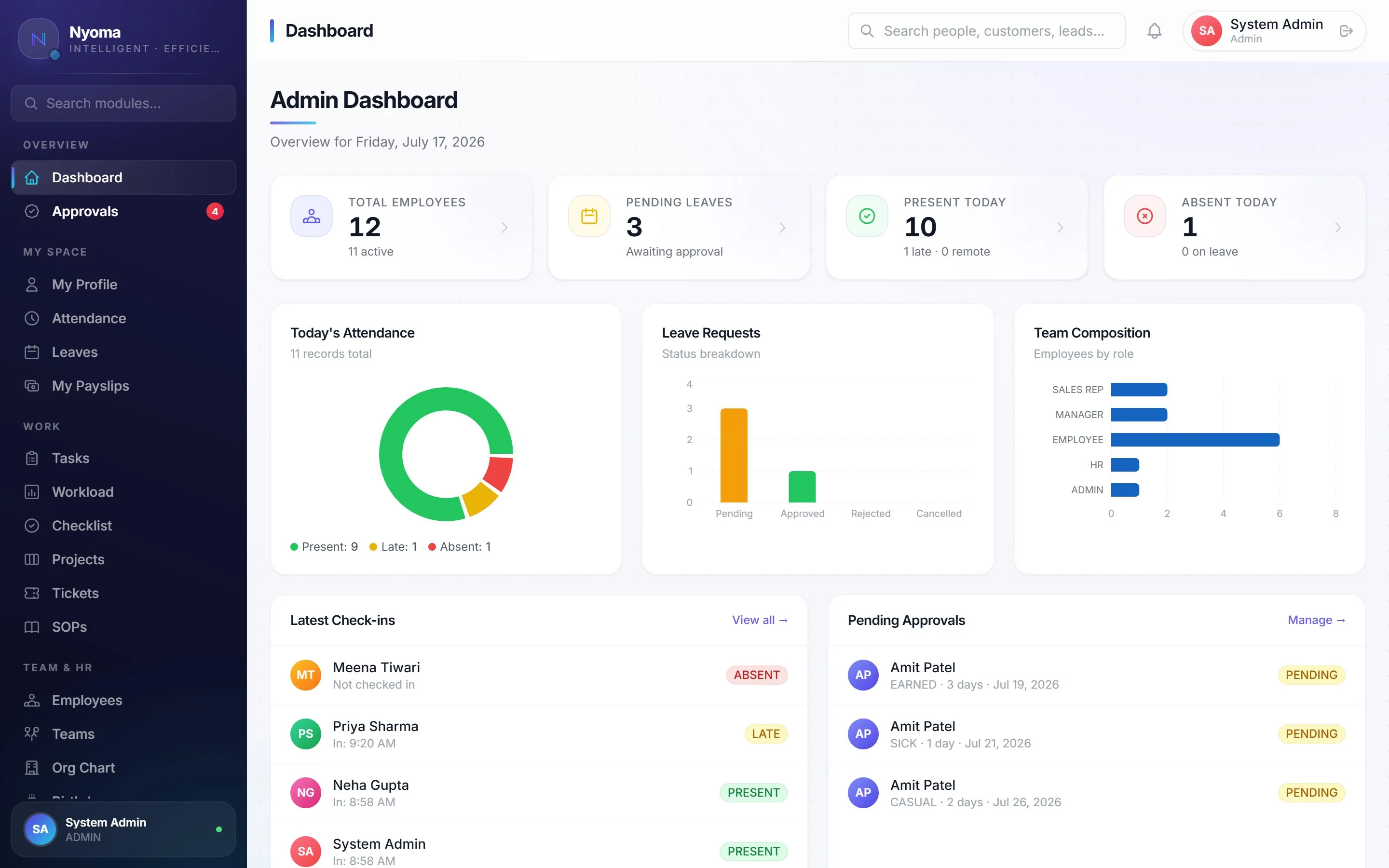
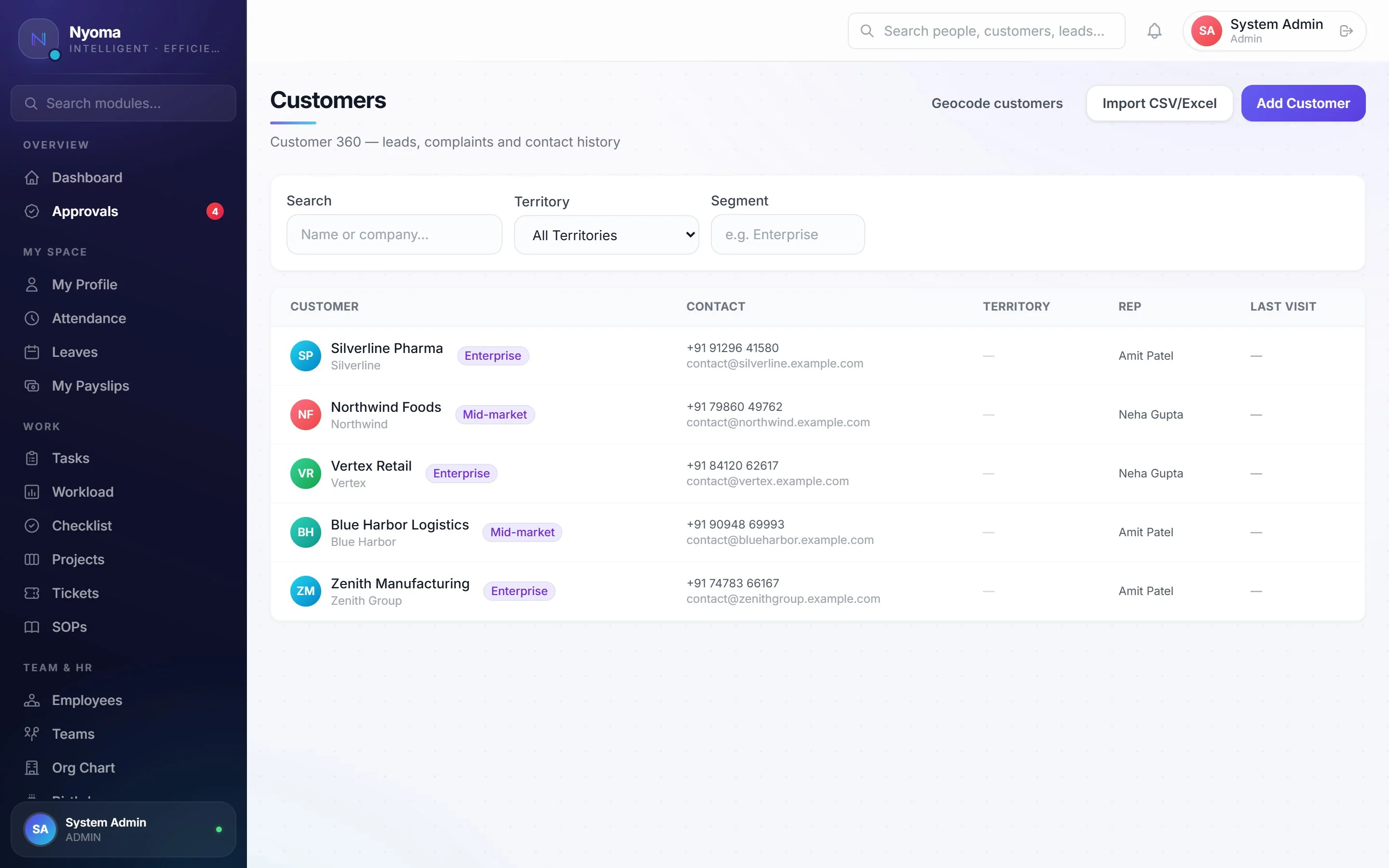
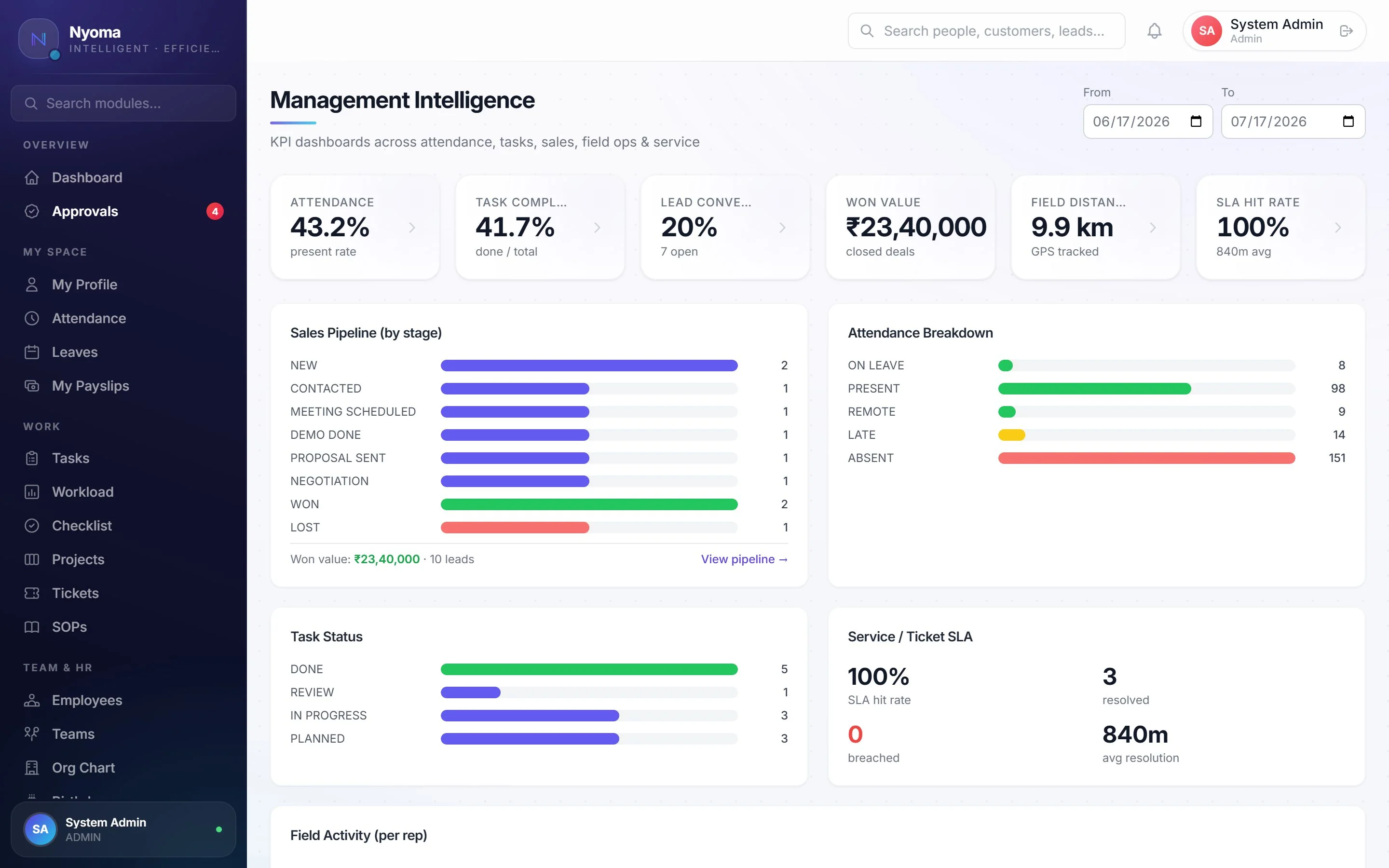
A representative journey through connected modules. The screens below are from the product; ask for a live demo to see each step in your own workflow.
A recorded end-to-end product walkthrough is being prepared. Book a live walkthrough to see the full sequence today.
Real screens from the live product — dashboards, field maps, CRM, payroll and more. Click any screen to enlarge.
Plus a full Android app for your field team — check-in, tasks, visits and expenses on the move.
A stack of deeply integrated modules replaces a dozen disconnected tools — one platform, one dataset, no silos.
Geo-fenced check-in across multiple offices, late detection, auto-absent, leave balances, approvals and regularization.
Assign work, track time, run Kanban boards and milestones, and score daily productivity automatically.
Live map of your reps, route replay, stop detection, visit logging with geofencing and travel-expense checks.
Customer 360, governed sales orders, pricing, dispatch, line-level delivery, POD, returns and backorders — built for field sales.
Country-aware payroll & statutory engine — local taxes and deductions handled out of the box — payslips, org chart and documents.
Internal & customer-portal tickets with priorities, SLA policies, breach alerts and an escalation engine.
Turn processes into a living, AI-assisted library — step-by-step runs, acknowledgements and full adherence visibility.
Team chat, email inbox, meetings with real Google Meet / Teams invites, announcements and an anonymous suggestion box.
KPI dashboards, performance leaderboards, custom report builder with Excel/PDF exports and scheduled emails.
AI email triage, business-intelligence briefs, SOP assistants and CRM insights that turn your data into next actions.
Tenant-owned data sources, durable external IDs, safe retries and provider-aware workflows for accounting, ERP and WMS onboarding.
Choose the authoritative source for products, pricing, inventory, invoices and receivables. Nyoma preserves external IDs, prevents duplicate posting, and keeps provider-specific activation behind a reviewed onboarding process.
Provider adapters are activated only after credentials, scope and sandbox acceptance are complete.
Not a chatbot bolted on the side — AI is woven through Nyoma, turning your everyday data into drafts, briefs and decisions.
Nyoma reads a thread, summarises it, drafts a reply in your chosen tone, and turns emails into tasks or tickets in one click.
Morning briefs, attendance risk, project delays and deal risk — generated from your live data, cached and reusable.
Extracts owners, deadlines and follow-ups from emails and meetings — no manual data entry.
Meeting prep from CRM context and crisp summaries afterwards, linked to the right customer.
"How do I…" answered strictly from your procedures — so the whole team follows the same playbook.
Role-aware dashboards give owners, HR, managers and reps exactly what they need — attendance rates, pipeline value, field activity and alerts, all in real time.
Track reps on a live map, replay routes, verify customer visits with GPS and 10-minute rules, and cross-check travel expenses automatically.
Attendance, projects, CRM, GPS, payroll and analytics share the same data — no exports, no reconciliation, no silos.
From email digests to management briefs and SOP guidance, AI is woven through the product — not bolted on as a gimmick.
Real GPS, offline-first mobile, visit verification and route history designed for teams who aren't at a desk.
A country-aware payroll and statutory engine — local taxes, deductions and compliance handled out of the box.
Strict tenant isolation, JWT auth, role-based access, encrypted secrets and a complete audit log on every write.
White-label colours and logo, per-user module access, and pricing that scales from a solo user to an enterprise.
Plan prices below are monthly per user. Your quote confirms seats, module access, integrations, setup, taxes and any additional charges before you commit.
No fixed minimum seat count is published. Integrations, migration, training and setup are scoped separately; we will state any fees in writing. Prices exclude applicable taxes. Request a full quote.
We agree on scope and timing with your team before enabling production use.
For sales, pilot scoping and support, email [email protected]. Support hours and response targets are agreed for your plan; no universal response SLA is published.
Explore real product screens, review our published controls, and ask us to demonstrate the exact workflow you need.
We have not published customer testimonials or pilot outcomes yet. We will add them only with the customer's approval and verifiable results.
Employees and sales reps get attendance, tasks, projects, leave, payslips, CRM, chat and field tools on Android — offline-first, with background GPS during duty hours and push notifications.
Prefer to dive in? Start your 14-day free trial → Or tell us about your team and we'll show you exactly how Nyoma fits your operation.
Already a customer? Log in to Nyoma →
Nyoma only requests access to your Google or Microsoft account when you choose to sign in with it or connect it — and only to power the features you use:
Your data is used only to provide these features — never sold and never used for advertising. You can disconnect at any time from Settings, which revokes Nyoma's access. See our Privacy Policy for full details.
Clear answers about the platform, mobile work, integrations, security and onboarding.
Nyoma is a workforce, sales and field-operations platform that brings attendance, tasks, CRM, delivery, HR, payroll and operational analytics into one tenant-isolated workspace.
Yes. Nyoma supports live GPS field operations, verified customer visits, route history and an offline-first Android experience for attendance, tasks, CRM and field work.
Nyoma has an integration-ready foundation for accounting, ERP and warehouse workflows. Each provider connection is enabled only after scope, credentials, mapping, sandbox testing and customer acceptance are reviewed.
Nyoma uses tenant isolation, role-based access, encrypted transport, server-side secret handling and audited changes. Integration jobs preserve stable external identifiers and retry safely.
A company can start a 14-day free trial or request a guided demo. Integration activation follows a separate review and acceptance process when external systems are involved.